
Popup biểu tượng tiện ích
Where in the UI: nhấp biểu tượng trên thanh Chrome → popup.html
Clip nhanh và khôi phục nút W
Interface elements
Chụp vùng
Lưu trang vào Unassigned
Hiện nút nổi (nếu đã ẩn)
Help / features → trang trợ giúp
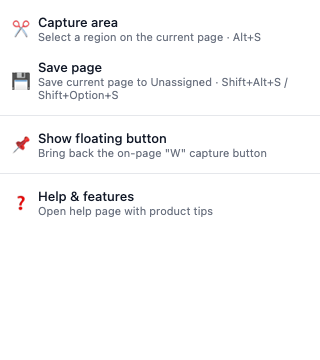
Popup tiện ích
Bảng hẹp với 2–4 thao tác clipper
Liên kết trợ giúp ở dưới
Didn’t find an answer?
Tell us what’s missing — we build the extension around real requests.